⚙️Setting: Favorite Coins and Keywords
⚙️ Settings
Create lists of favorite coins, unwanted coins, and keywords to use when configuring each category. Combining different filters will help you eliminate noise and use valuable information more effectively!
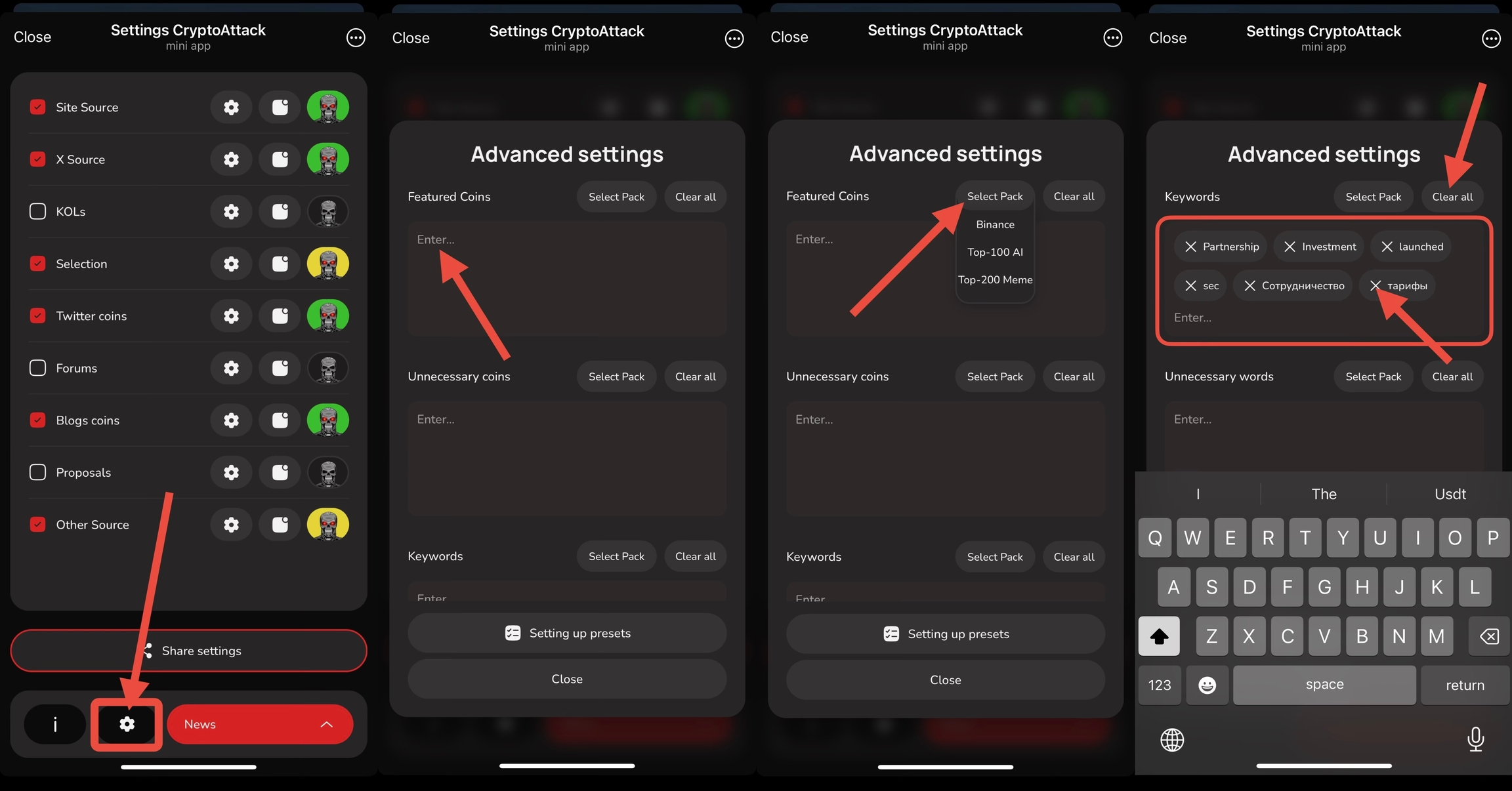
Click the "🚀 Settings" button in the bottom menu or use the /settings command.
Then click the ⚙️ icon as shown in the screenshot above.
Select the appropriate field to create a list: Favorite Tokens, Ignored Tokens, Keywords, or Ignored Words.
Enter token tickers or keywords separated by spaces (ticker -> space -> another ticker).
You can also choose from ready-made token lists.
You can remove individual words or tickers from the list or completely clear the list by clicking "Clear All". To edit, simply delete or add words and tokens to the list manually.
⚠️ When you completely delete a list, the corresponding filter will be disabled across all categories! Therefore, if you need to modify the list, select "Edit List" only. This way, your settings will not change.
📂 "Latest" works with the filters you have selected, allowing you to influence search results by adjusting filters or lists of coins and keywords! Edit your lists and view the information you need by enabling the "Favorite Coins" filter. You can now finely tune and review notification history.
💡 Use these filters if you are certain of their necessity and know that the tracked tokens are present in the category. Since we gather data from various sources and the volume is substantial, token monitoring coverage may vary. It might be worthwhile to observe category information for some time without applying these filters.
The system first checks the information against your "Favorite Coins" list if this filter is active, then checks the "Unwanted Coins" and "Keywords" lists. Filtering occurs sequentially: "Favorite Coins," then "Unwanted Coins," and finally with the "Keywords" filter (if more than one filter is applied in category settings). If there are other filters in the category settings, the system will first check and sort by those filters! Keep this algorithm in mind when using multiple filters.
Keywords can be used to track addresses when they are specified in the category in the format #...... (the first 7 characters of the address).
Last updated