# Your Own Presets: Management and Creation
Create and share your own settings presets!
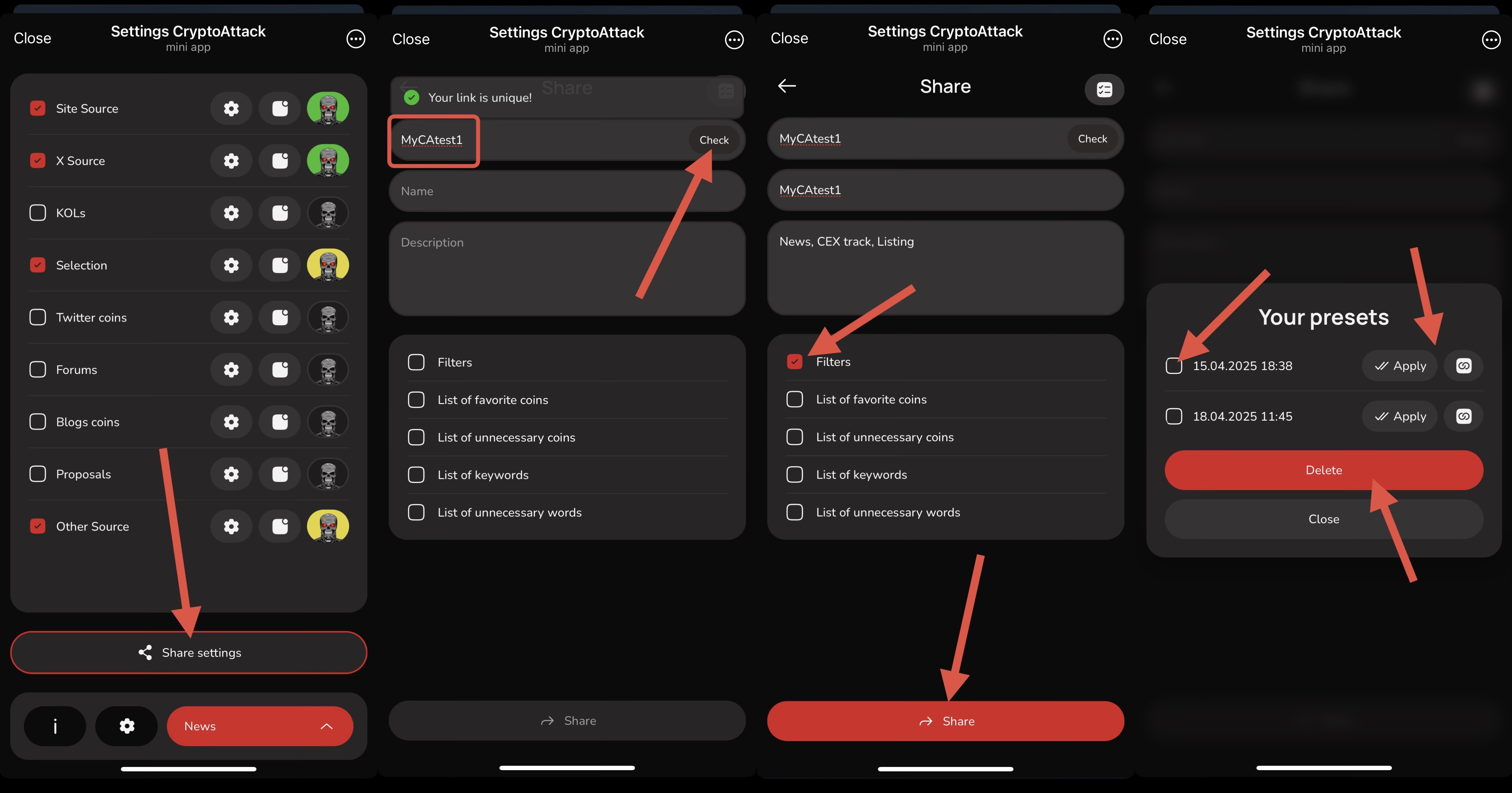
* Go to the **"Settings"** section.
* Click the **"Share Settings"** button.
* Enter a link name and make sure to click **"Check"** to verify its uniqueness. Confirm that the name is available.
* Create a name and description for your preset.
* Click **"Share"** to publish and save your preset.
😎 The link to your preset acts as a **hidden referral link**, allowing you to [earn rewards from the activity of users who use it.](https://cryptoattack.gitbook.io/cryptoattackbot_en/partnership-invite-and-earn)
After creating a preset, click the icon in the top right corner to open the list of your saved presets. Here, you can:
* View your automatically saved and manually created presets
* **Delete** a preset by selecting it and clicking **"Delete"**
* **Copy** the link to a preset
* **Apply** any of your saved presets
> **Presets with dates are automatically created when you follow someone else's settings link or choose a ready-made preset — so don't worry, your settings are safely stored!**
💡 You can save different lists of words and coins through presets, create multiple filter configurations, and **quickly switch between them** when needed.