# Activation of multibots
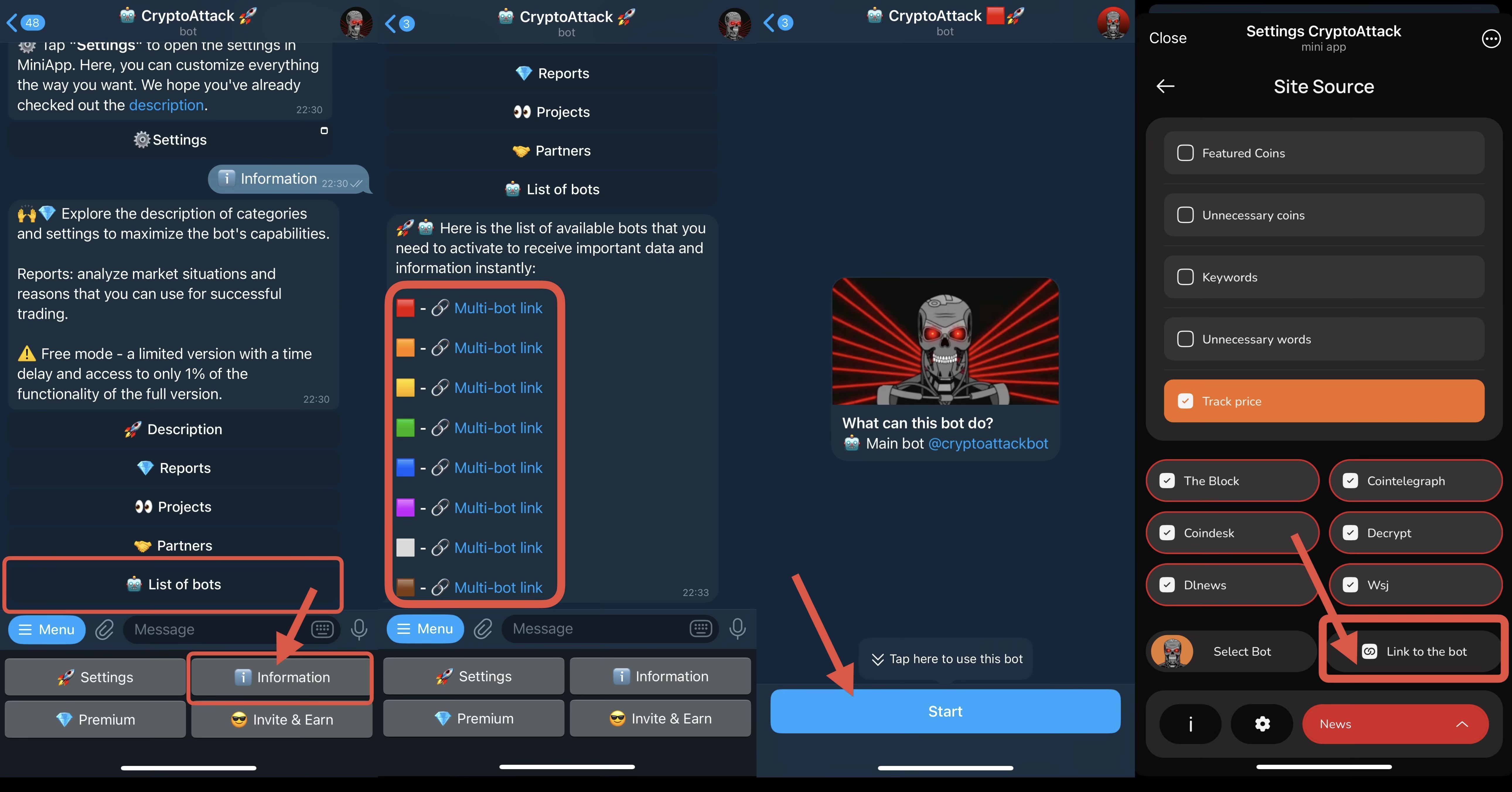
Before setting up and enabling a category, you need to **activate 8 bots,** each with its own color. These bots will be your personal assistants for distributing categories. Now you have 8 bots that you can customize individually!
Why is this necessary?
Firstly, we generate more than 50,000 messages per day, the Telegram API has its own limitations, which depend on the speed of message delivery. Distribution of the information flow helps to receive data faster and take into account blocking by Telegram.
Secondly, the presence of a number of categories in our bot requires competent distribution. For example, you can send notifications about listings, important news and large transfers of market makers in a separate bot and turn on the sound in this bot. Or you can set up a category from the Smart Money section in another bot.\
\
**How to activate multibots:**
* Click **"Information"** and then the **"List of Bots"** button.
* Follow each of the 8 links. You can use any number of bots.
* Click **Start (/start)** to activate each bot you want to use.
* Now you have **8 color-coded bots** available for category setup.
Before enabling a category, you must select the bot where it will be active. To do this, click **"Select Bot"** inside each category and choose one of the 8 colored bots corresponding to the bot colors. You can also switch bots directly from any category settings window or through the main **Settings** window.
💡 In each of your color-coded bots (a total of 8), you can **pin messages with category hashtags** (for example: 🟨 #Listing #Cextrack) that you send to that bot. You can write notes for yourself and pin them, or pin important notifications that you want to easily access later.
💡 You can **forward messages** from your color-coded bots to the **main bot** to quickly open a chart for a specific token. Simply forward any notification (that contains a coin tag like #BTC or $ETH) to **@cryptoattackbot**, and the bot will generate a direct link to the chart window.
⚠️ **Please note: avoid directing too many categories into a single bot.**\
**Using filters and multiple bots is important to manage the flow of information properly.**\
**Otherwise, Telegram may temporarily block your chat with a bot due to excessive activity, causing you to miss notifications for several minutes or even hours.**\
**Use filters and token/word lists to reduce the volume while improving the quality of alerts.**\
**Thank you for your understanding!**